ChromiumFish
A fingerprint-hardened Chromium fork that presents a coherent, consistent browser persona, with a drop-in Playwright harness for Python and Node.
Unlike JavaScript-patch stealth libraries, the spoofing is done natively in the engine (C++). There are no Function.prototype.toString tampering tells, navigator.webdriver stays false even under CDP, and there are no cdc_ automation artifacts.
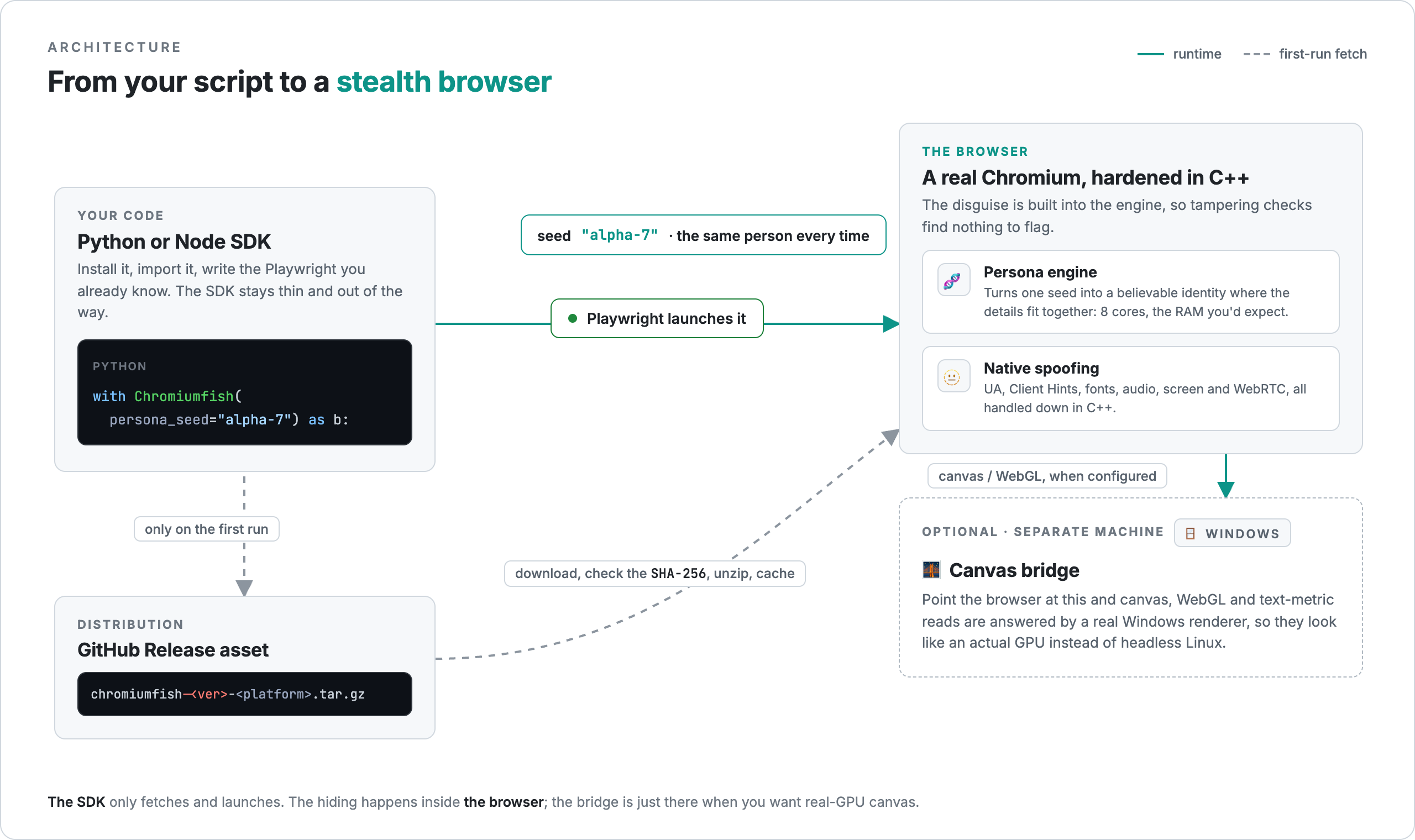
This site documents the chromiumfish SDKs, the pip and npm packages that download the matching browser build and launch it through Playwright with familiar, drop-in ergonomics. The SDKs carry no fingerprinting logic of their own; they fetch, verify, and cache the binary, then launch it.
Why ChromiumFish
- Native spoofing. User-Agent, Client Hints, the WebGL vendor/renderer string (it reports a real D3D11/ANGLE GPU, with no Apple/Metal tells), fonts, audio, screen metrics, and WebRTC are all handled in the engine, coherent and tamper-free.
- Per-seed personas. One
persona_seed, any stable string id, produces one stable, internally consistent identity. Reuse it for continuity, or change it for a fresh, uncorrelated persona. - Optional canvas-bridge. Canvas and WebGL reads aren’t spoofed in the engine. For those, you can point the browser at the canvas-bridge, a separate render service that runs on a real Windows GPU. With it,
toDataURL,getImageData,readPixels, andmeasureTextcome back looking like an actual GPU instead of headless-Linux SwiftShader. Without it, those reads pass through clean. - Timezone follows the proxy. Pass
timezone="auto"and the browser’s timezone is set from your egress IP, so it lines up with the proxy you’re routing through. - Pin a GPS location. Set
--persona-lat/--persona-lngand the browser auto-grants the Geolocation permission and reports that exact position to every frame — no prompt, and the real location providers are never queried. See Personas. - It’s just Chromium. Everything you know about Playwright applies; the SDK is a thin wrapper over
chromium.launch(executablePath=...). - Native AI agent. Beyond driving it yourself, hand the browser a plain-language task and its built-in agent perceives the page and acts — click, type, read, navigate — in a loop, driven by any OpenAI-compatible LLM. See AI Agent.
How distribution works
The browser is built privately and published as GitHub Release assets on the public arman-bd/chromiumfish repo. On first use, the SDK resolves the version to the right platform asset, verifies its SHA-256, extracts it to ~/.cache/chromiumfish/<version>/, and hands the path to Playwright.
Next steps
- Installation — add ChromiumFish to a Python or Node project.
- Quickstart — launch a stealth browser in five lines.
- AI Agent — hand the browser a plain-language task; its built-in agent perceives and acts.
- Personas — stable, rotatable identities via
persona_seed. - Canvas & WebGL bridge — the optional render service for real-GPU pixels.
- Recipes — copy-pasteable patterns: parallel personas, session reuse, proxies.
- Troubleshooting — fixes for the common launch, proxy, and block issues.
- API Reference — full options for both SDKs.
Disclaimer. ChromiumFish is provided for educational and authorized research purposes only. You are solely responsible for how you use it, and must comply with all applicable laws and the terms of service of any site or service you interact with. The software is provided “as is”, without warranty of any kind; to the maximum extent permitted by law, the author and contributors accept no liability for any damage or loss arising from its use or misuse.
ChromiumFish is an independent fork of the Chromium project and is not affiliated with or endorsed by Google.